Writing your first Java Program
With the JDK installed we can now create our first Java program.
Creating the Simple Java Program
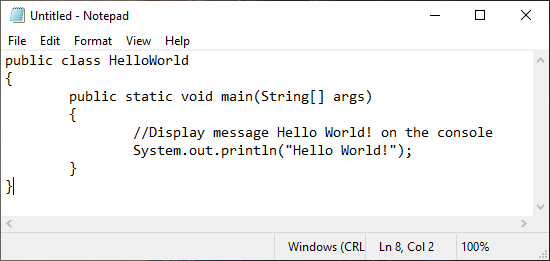
Open notepad and enter in the Simple Java Program. If you have forgotten the code is listed below.
1 2 3 4 5 6 7 8 | public class HelloWorld { public static void main(String[] args) { //Display message Hello World! on the console System.out.println("Hello World!"); } } |
Important
Remember to save the file as HelloWorld.java.
Compiling the Simple Java Program
To compile HelloWorld.java open command prompt as Administrator.
Navigate to the location of HelloWorld.java. An example is shown below.
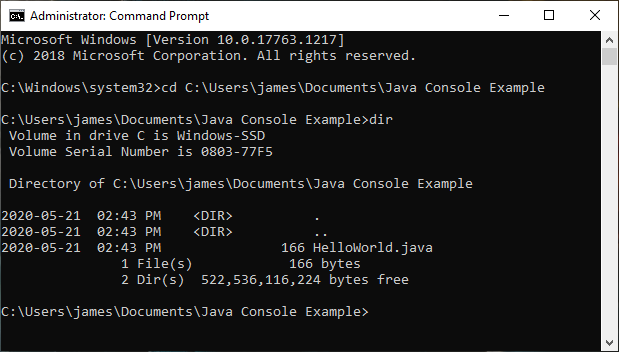
Once navigated to the correct folder you can verify HelloWorld.java is there by using the command dir.
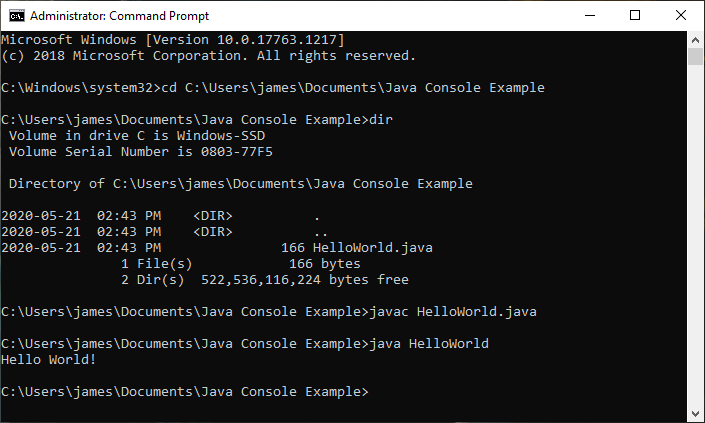
Once HelloWorld.java is verified to be in the folder run the following command.
javac HelloWorld.java
Running the Simple Java Program
While still in the location of the HelloWorld.java in the command prompt run the command:
java HelloWorld
Tip
If you would like view the Java bytecode you can run the command javap -c HelloWorld.class.